
TradeSnap AI for builders & multi-trade
The quoting and invoicing app for builders and multi-trade firms
Bigger jobs mean more trades, more stages and more ways for a price to go wrong. TradeSnap keeps every stage of the job — and every trade in it — on one clear record, from first brief to final invoice.

- Free to download
- On iPhone and iPad
- Your own builder rates
A real example
From Dan’s message to a priced quote.
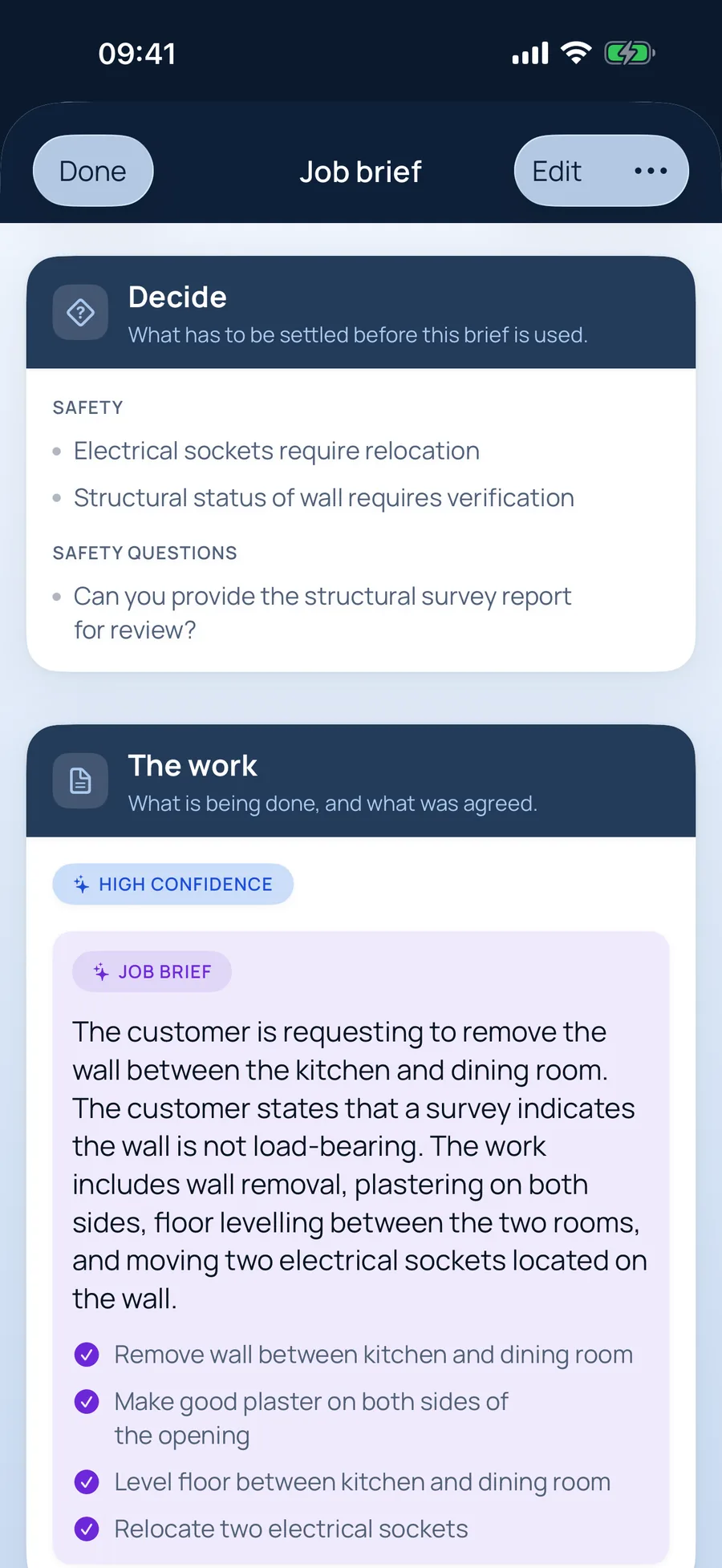
This is a real customer message sent to TradeSnap AI, and the brief it wrote back — unedited. The quote is what you’d send after a quick check.
The customer’s message
What TradeSnap AI picked out
The job brief for builders
- Remove wall between kitchen and dining room
- Make good plaster on both sides of the opening
- Level floor between kitchen and dining room
- Relocate two electrical sockets
And it asked: “Are there any other services (gas, water, heating) running through the wall?”
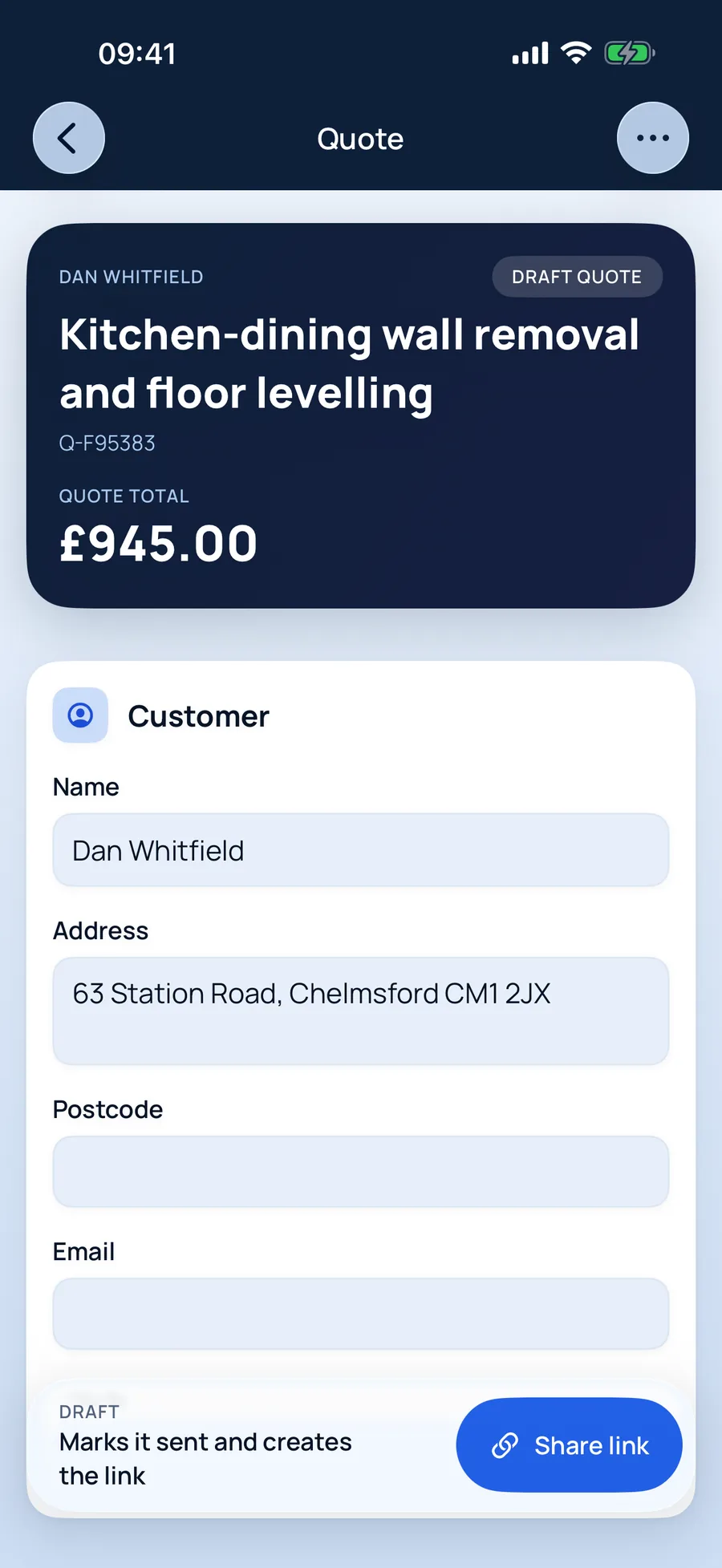
The quote, ready to review
Kitchen-dining wall removal and floor levelling£945
Why builders & multi-trade use it
Built around how builders actually quote.
Several trades, one job
Building, plastering and electrical work each priced at the right rate, on one quote the customer can follow.
Stages that stay separate
Survey, main works and extras each keep their own brief, quote and invoice — so variations never blur into the original price.
Changes confirmed, not assumed
When the job changes on site, confirm the variation and it's priced and recorded before it's invoiced.
Jobs builders & multi-trade quote with TradeSnap
- Knock-throughs
- Kitchen and bathroom refurbs
- Plastering and making good
- Extensions
- Garage conversions
- Property maintenance
How it works
Five steps from enquiry to paid.
- 01
Say it, snap it, paste it
Record a voice note on site, paste the customer’s texts or screenshot the WhatsApp thread. Add photos for your records. No signal? It’s saved on your phone and syncs when you’re back online.
- 02
A job brief that catches what matters
TradeSnap AI reads everything and writes the brief: the work, what was agreed, what matters to the customer, anything it isn’t sure of, safety concerns and the questions still to ask. It even fills in the customer’s name and address. You check it — nothing moves on until you do.
- 03
Prices you can see the working for
Your own rates come first. Where you haven’t set a price, TradeSnap shows a typical UK range, where it came from and how sure it is — and you choose the figure. Prices you save are ready for next time.
- 04
Your customer says yes from their phone
Send a link instead of an attachment. Your customer sees a clean, professional quote, can ask a question, and accepts with their name as a digital signature. You’re notified when they open it, and again when they say yes.
- 05
Invoice in a tap. Track every payment.
Turn the accepted quote into an invoice without typing anything again. Record part payments, refunds and credit notes, and keep a clean history of who has paid what.
Voice notes into paperwork
Talk through the job on site; TradeSnap turns it into a written brief.
Reads customer messages
Screenshots of texts and WhatsApps become part of the job, not lost in your camera roll.
Safety concerns flagged
Anything risky the customer mentions goes to the top of the brief.
Quotes accepted online
Customers accept with a digital signature, ask a question or decline — from a link.
Questions from builders & multi-trade
Good to know.
More answers in the main FAQ, or email us and a person will reply.
Can one job have more than one quote?
Yes. A job can have several stages — a survey, the main works and any extra work — each with its own quote and invoice.
Does TradeSnap handle VAT?
Yes. Turn on VAT in settings and quotes and invoices show it properly. You stay responsible for the right VAT treatment.
TradeSnap for other trades
TradeSnap AI · Free to download
Your next quote could be done before you leave the drive.
Download TradeSnap on iPhone and iPad and price up your next job with it. You’ll feel the difference on the first one.

Scan with your phone’s camera to download