
TradeSnap AI for roofers
The quoting and invoicing app for roofers
Slates after a storm, a damp ceiling, gutters full of moss. TradeSnap separates each repair, keeps access and equipment on the price, and won't pretend to quote a whole new roof from one photo.

- Free to download
- On iPhone and iPad
- Your own roofer rates
A real example
From Linda’s message to a priced quote.
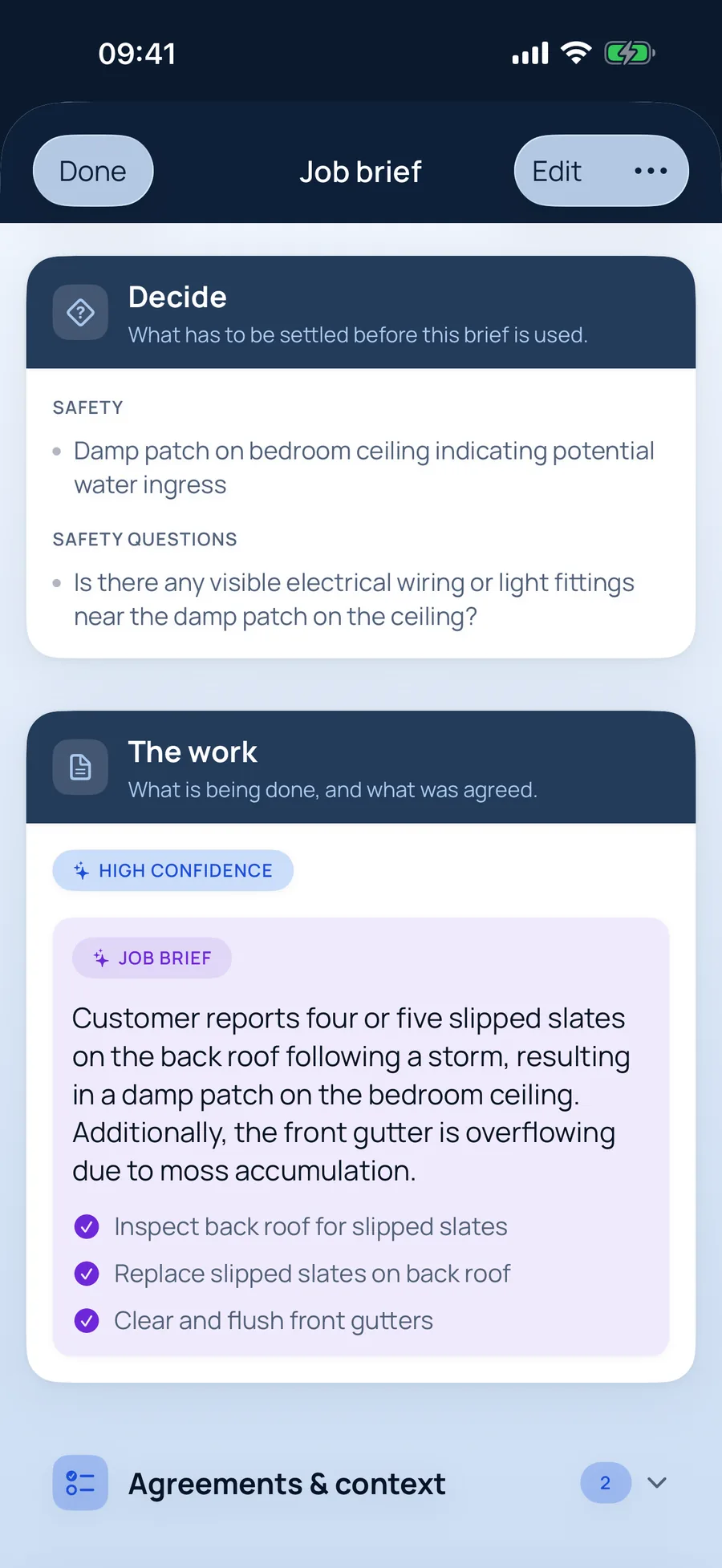
This is a real customer message sent to TradeSnap AI, and the brief it wrote back — unedited. The quote is what you’d send after a quick check.
The customer’s message
What TradeSnap AI picked out
The job brief for roofers
- Inspect back roof for slipped slates
- Replace slipped slates on back roof
- Clear and flush front gutters
And it asked: “Is there any visible electrical wiring or light fittings near the damp patch on the ceiling?”
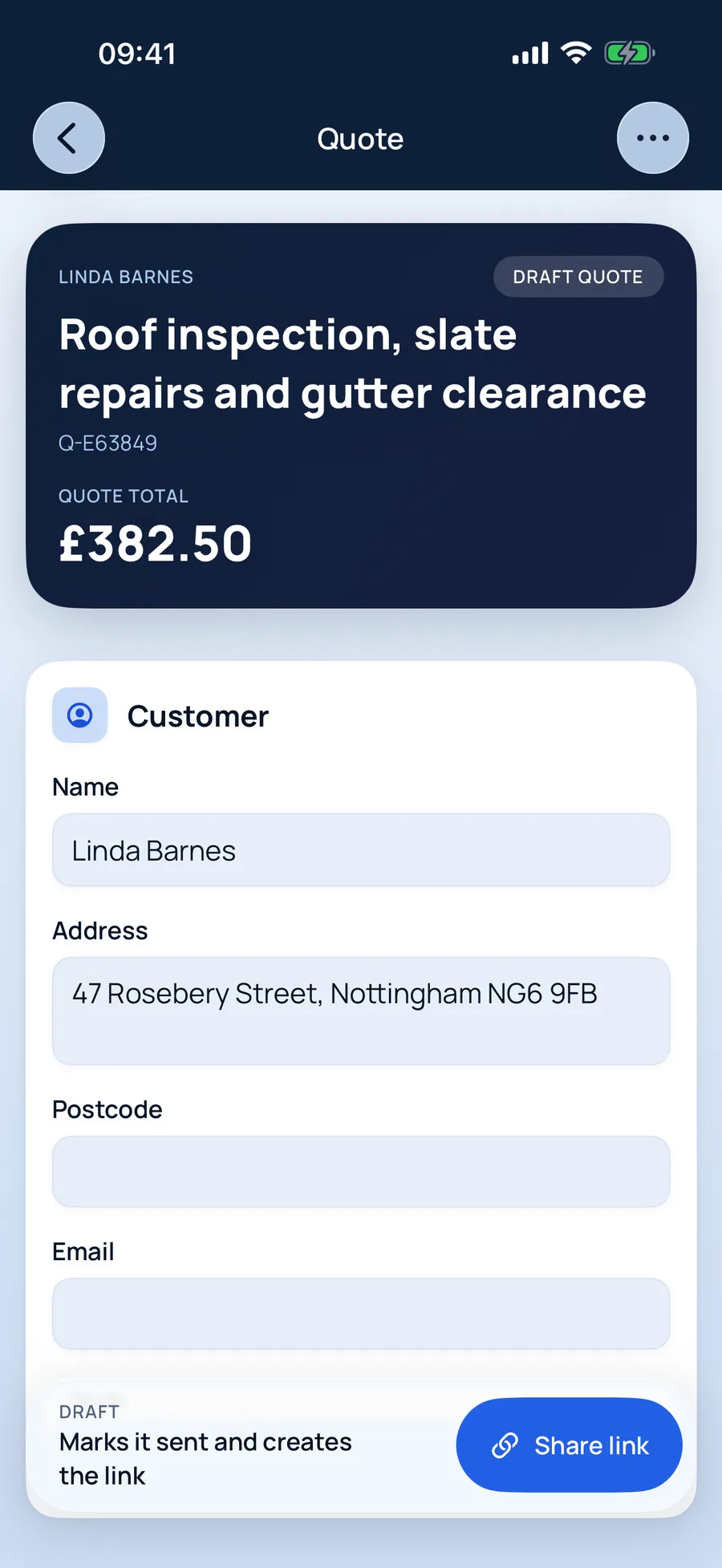
The quote, ready to review
Roof inspection, slate repairs and gutter clearance£382.50
Why roofers use it
Built around how roofers actually quote.
Access is never an afterthought
Towers, scaffold and awkward pitches mentioned in the conversation stay in the brief, so they end up on the price.
Honest about what a photo can show
Asked to quote a full re-roof from a garden snapshot? TradeSnap recommends an inspection first rather than inventing a figure.
Storm work, invoiced fast
Record part payments against the invoice as they come in, and see at a glance who still owes you.
Jobs roofers quote with TradeSnap
- Slipped and broken slates
- Leak investigations
- Gutter clearing
- Ridge tiles and pointing
- Lead flashing
- Flat roof repairs
How it works
Five steps from enquiry to paid.
- 01
Say it, snap it, paste it
Record a voice note on site, paste the customer’s texts or screenshot the WhatsApp thread. Add photos for your records. No signal? It’s saved on your phone and syncs when you’re back online.
- 02
A job brief that catches what matters
TradeSnap AI reads everything and writes the brief: the work, what was agreed, what matters to the customer, anything it isn’t sure of, safety concerns and the questions still to ask. It even fills in the customer’s name and address. You check it — nothing moves on until you do.
- 03
Prices you can see the working for
Your own rates come first. Where you haven’t set a price, TradeSnap shows a typical UK range, where it came from and how sure it is — and you choose the figure. Prices you save are ready for next time.
- 04
Your customer says yes from their phone
Send a link instead of an attachment. Your customer sees a clean, professional quote, can ask a question, and accepts with their name as a digital signature. You’re notified when they open it, and again when they say yes.
- 05
Invoice in a tap. Track every payment.
Turn the accepted quote into an invoice without typing anything again. Record part payments, refunds and credit notes, and keep a clean history of who has paid what.
Voice notes into paperwork
Talk through the job on site; TradeSnap turns it into a written brief.
Reads customer messages
Screenshots of texts and WhatsApps become part of the job, not lost in your camera roll.
Safety concerns flagged
Anything risky the customer mentions goes to the top of the brief.
Quotes accepted online
Customers accept with a digital signature, ask a question or decline — from a link.
Questions from roofers
Good to know.
More answers in the main FAQ, or email us and a person will reply.
Can I add scaffolding or tower hire to a quote?
Yes — as its own line, so the customer understands why access costs what it does.
Does the AI look at my roof photos?
No. Ordinary job photos are stored as your record of the job but never sent to the AI. Only screenshots of customer conversations are read.
TradeSnap for other trades
TradeSnap AI · Free to download
Your next quote could be done before you leave the drive.
Download TradeSnap on iPhone and iPad and price up your next job with it. You’ll feel the difference on the first one.

Scan with your phone’s camera to download